

Before we dive into Pinterest group boards, let’s clear up a very common misconception. Pinterest is not a social media platform. It is a visual search engine.
People don’t open Pinterest to socialize. They open it to search. They search for ideas, tutorials, products, inspiration, and solutions.
That’s why Pinterest works differently from platforms like Instagram or Facebook.
Content is discovered through keywords, relevance, and user behavior. This is also why strategy matters so much.
If you’ve been wondering whether Pinterest boards are still effective and whether group boards are worth your time today, this guide will walk you through everything you need to know in a practical and honest way.
What Are Pinterest Boards?
Pinterest boards are essentially folders where you organize your pins.
Think of them as categories on your blog. Each board should represent a clear topic or niche. For example, if you are a lifestyle blogger, you might have boards like “Healthy Living,” “Lifestyle Ideas,” or “Minimalism.”
Boards help you categorize and organize your content, so Pinterest understands what your profile is about. When your boards are clearly defined and optimized with keywords in the board title and description, it strengthens your Pinterest SEO.
Well-structured boards also improve user experience. When someone lands on your profile, they can easily navigate your content and find what they’re looking for.
So yes, Pinterest boards are still effective — especially when they are niche-focused and keyword optimized.
You may also like to read:
How to create boards on Pinterest?
How to choose the perfect name for Pinterest boards?
How to organize Pinterest boards?
What are Pinterest board sections?
What Are Group Boards?
Group boards are collaborative boards where multiple contributors can add pins.
Instead of being owned and managed by just one person, group boards allow the board owner to invite other creators to pin content. All contributors can share content related to the board’s topic.
Years ago, group boards were extremely popular. Creators joined large boards with thousands of followers to gain quick exposure. The idea was simple: more contributors meant more reach.
However, Pinterest’s algorithm has evolved. Today, Pinterest prioritizes content quality, relevance, and individual account performance over sheer volume.
This doesn’t mean group boards are useless. It just means they need to be used strategically.
Benefits of Group Boards
If chosen wisely, group boards can still offer benefits.
The first benefit is increased exposure. When you pin to a group board, your content can potentially be seen by the board’s followers as well as the audiences of other contributors. This can give your pin more initial visibility.
Group boards can also help newer accounts gain traction. If your account is new and doesn’t have much activity yet, contributing to a strong niche board may help your content get noticed.
Another benefit is collaboration and networking. You may connect with other creators in your niche, which can open opportunities for partnerships and support.
That said, these benefits only apply when the board is well-managed, niche-specific, and not overloaded with spammy or irrelevant pins.
How to Find Group Boards?
Finding quality group boards today requires intention and research.
Start by using Pinterest’s search bar. Type your niche keyword followed by “group board.” For example, if your niche is blogging, search “blogging group board.” Look for boards that display multiple profile names under the board name, which indicates multiple contributors.
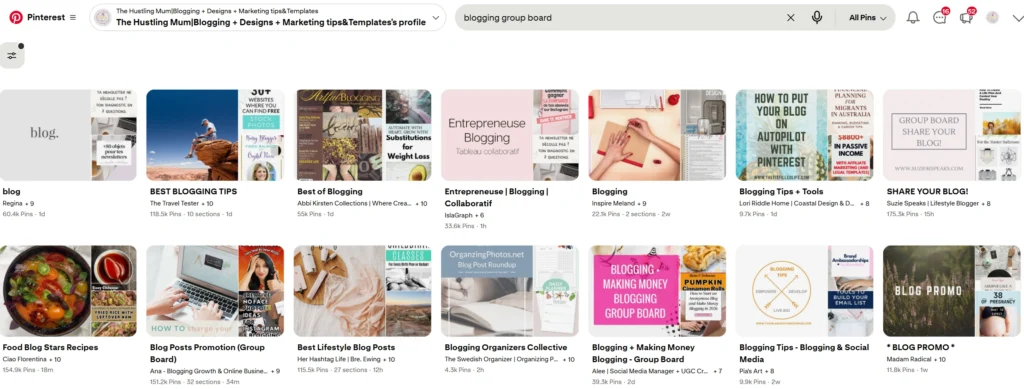
Next, visit profiles in your niche. Some creators mention in their board descriptions that they accept collaborators. You may also see boards labeled as group boards when you open them.
When evaluating a board, check these things carefully:
Is the board highly niche-focused?
Are the pins relevant to the board topic?
Is the board active with recent pins?
Do the pins look high quality?
Does the board avoid excessive, repetitive posting?
Avoid boards that look cluttered or contain mixed, unrelated topics. Pinterest does not favor spammy group boards anymore.
Quality over quantity always wins.
How to Join Group Boards
Most group boards require an invitation from the board owner.
Some owners include instructions in the board description. They may ask you to send a message, email them, or follow specific steps before requesting access.
If you decide to reach out, keep your message professional and short. Introduce yourself, explain your niche, and clarify why your content would fit well within the board.
Once invited, follow the board rules carefully. Some boards limit the number of daily pins. Others require that you repin content from fellow contributors.
Remember, Pinterest’s algorithm today focuses more on your own account’s performance rather than shared board exposure. So, joining a group board should complement your strategy, not replace it.
Should You Join Pinterest Group Boards?
A few years back, group boards were a big growth strategy. They helped drive significant traffic and were almost essential for many creators.
But today, they are not as effective as they once were.
Pinterest no longer favors boards that are spammy or overloaded with irrelevant content. If a board has too many contributors posting unrelated pins, it can actually hurt visibility.
My advice as a Pinterest expert is simple. If you find highly niche-focused group boards that are well-managed and aligned with your content, you can join them. They can help you get more eyes on your pins, and that may lead to increased traffic.
However, be careful.
Do not join too many group boards. Do not join boards that look messy or unfocused. Monitor performance regularly. If a board is not bringing value, step away.
The real question is: are Pinterest boards still effective? Absolutely — especially your own optimized boards. Your personal boards should always be your priority. Group boards can be an additional layer, but not your main strategy.
How to Delete Pins in a Group Board
This is something many creators misunderstand.
If you are not the owner of the group board, you cannot delete other contributors’ pins. You can only remove your own pins from the board.
If you are the board owner, you have full control. You can remove any pin that does not follow the board guidelines.
If you are a collaborator, your permissions depend on the access level given by the owner. Some collaborators can only add pins, while others may have editing permissions.
Always check your role before trying to manage or remove content.
Also read:
How to delete pins from Pinterest group boards.
Final Thoughts
Pinterest group boards are no longer the shortcut they once seemed to be. Pinterest is a visual search engine that rewards relevance, consistency, and high-quality content.
Your own niche-focused boards, optimized with strong keywords and clear organization, will always be the foundation of your growth.
Group boards can still provide additional exposure if they are carefully chosen and well-managed. But avoid spammy boards, stay aligned with your niche, and don’t rely on them as your primary growth strategy.
Sustainable Pinterest success comes from strategy, fresh content, and consistency.
Be selective. Be intentional. And build your Pinterest presence in a way that supports long-term, steady traffic rather than quick wins.
If you found this post helpful, don’t forget to pin it and share it with your friends.
Related posts:
How to create boards on Pinterest?
How to organize Pinterest boards?
What are Pinterest board sections?
How to delete pins from Pinterest group boards.
How to join Pinterest group boards?
List of Pinterest group boards to join.


I am a passionate blogger who loves sharing insights on blogging tips, Pinterest strategies, and making money online. With a knack for simplifying complex concepts, I help readers grow their online presence and achieve their Pinterest marketing goals. Follow along for practical advice and proven tactics to elevate your blog, Pinterest and online business.