

Pinterest may look like a social platform, but it actually works more like a visual discovery engine. People use it to search for ideas, tutorials, products, and inspiration. Content is ranked based on keywords and relevance, not followers.
That’s why learning how to find group boards on Pinterest requires a search-based approach. If you treat it like a search engine instead of social media, you’ll find better opportunities and avoid wasting time.
Let’s go step by step.
What Are Pinterest Group Boards?
Pinterest group boards are shared boards where multiple contributors can save pins.
Just like regular boards, they act as folders to keep pins organized by topic. They help categorize and structure content so Pinterest understands what the board is about.
The key difference is that group boards allow collaboration. One person owns the board, but invited contributors can add content related to the niche.
These boards should remain organized and topic-focused, just like personal boards.
You may also like to read:
Pinterest group boards – everything you need to know.
How to optimize Pinterest boards?
What Is the Difference Between Boards and Group Boards on Pinterest?
The difference comes down to control and collaboration.
A regular board is owned and managed by one person. Only the owner can add or remove pins unless they invite collaborators.
A group board allows multiple contributors to add pins. The owner controls permissions and decides who can participate.
In simple terms:
Regular boards are personal.
Group boards are collaborative.
Both organize content, but group boards involve shared contribution.
How to Find Group Boards on Pinterest
If you’re wondering how to find Pinterest group boards today, you need a strategic approach. Pinterest no longer promotes group boards the way it once did, so manual research is essential.
Here are the most reliable and up-to-date ways:
1. Use Pinterest Search with Niche Keywords
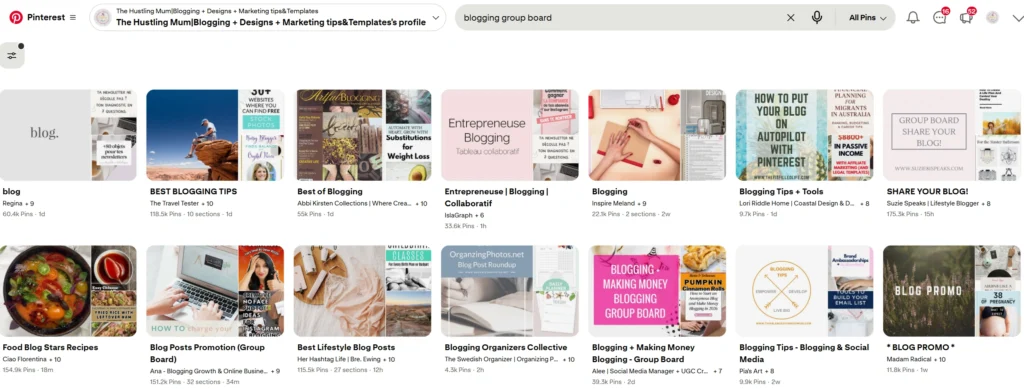
Go to the Pinterest search bar and type your niche keyword followed by “group board.”
For example:
“blogging group board”
“home decor group board”
After searching, click on the “Boards” filter to narrow results. Open boards and look for multiple profile icons under the board name. That usually indicates multiple contributors, meaning it’s a group board.
2. Research Profiles in Your Niche

Visit active creators in your niche.
Go to their profile and click on the “Saved” tab to view their boards. If you see boards displaying multiple profile icons under the title, those are group boards.
This method is one of the most effective ways to learn how to find group boards on Pinterest because you’re discovering boards already active within your niche.
3. Look for Contributor Icons on Boards
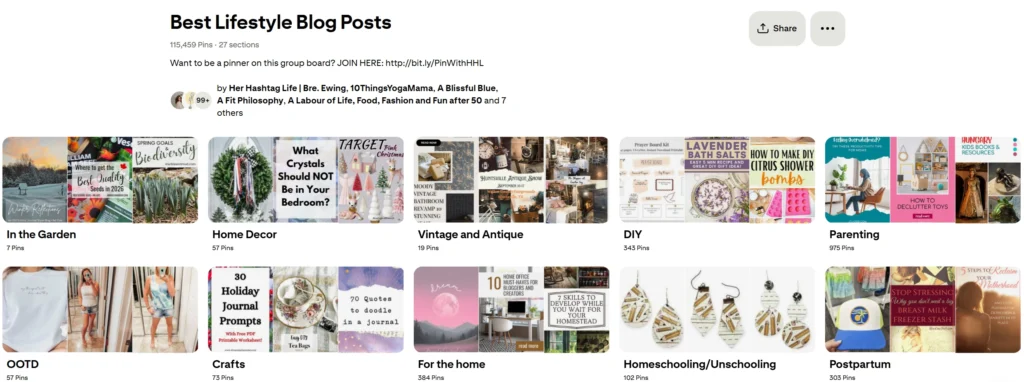
One more way to find Pinterest group boards is to look for contributors when you open a board. Pinterest shows small circular profile images under the board title if multiple contributors are involved.
Click those icons to view the list of contributors. This confirms it’s a group board.
This visual indicator is one of the easiest ways to identify group boards quickly.
How to Evaluate Pinterest Group Boards Before Joining
Before you decide a board is worth joining, you need to evaluate it carefully. This step is crucial for SEO and overall account health.
Ask yourself:
Is the board highly niche-focused?
Are the pins relevant to the board’s topic?
Are there recent pins being added?
Does the content look high quality?
Pinterest now prioritizes relevance and quality over volume. If a board looks cluttered, off-topic, or spammy, it will not benefit your account.
Well-managed, niche-specific boards are far more valuable than large but unfocused ones.
Being selective protects your account performance and helps you grow strategically.
How to Join Group Boards on Pinterest
Most group boards require an invitation from the board owner.
Some board owners include instructions in the board description on how to request access. This is why checking the board description carefully is important at this stage. They may ask you to send a message, email, or follow specific guidelines before applying.
If you reach out, keep your message short and professional. Introduce yourself, explain your niche, and clarify why your content would fit well with the board.
Once accepted, follow the board rules carefully. Avoid over-pinning and stay aligned with the topic.
Final Word
Learning how to find group boards on Pinterest is about strategy, not speed.
Pinterest works like a search engine. Relevance and quality matter more than numbers. If you research properly, evaluate boards carefully, and stay niche-focused, group boards can support your visibility.
But always remember, your own optimized boards and strong content should remain your foundation.
Be intentional. Be selective. And treat Pinterest like the search engine it truly is.
If you found this post helpful, don’t forget to pin it and share it with your friends.
Related posts:
What are Pinterest group boards?
How to delete a pin from a Pinterest group board?
How to join group boards on Pinterest?
Best Pinterest group boards to join.


I am a passionate blogger who loves sharing insights on blogging tips, Pinterest strategies, and making money online. With a knack for simplifying complex concepts, I help readers grow their online presence and achieve their Pinterest marketing goals. Follow along for practical advice and proven tactics to elevate your blog, Pinterest and online business.