

Let’s have a real conversation about group boards.
A few years ago, Pinterest heavily favored group boards. Bloggers joined dozens of them because they helped content spread quickly. Back then, they were almost a growth shortcut.
But Pinterest has evolved.
Today, Pinterest prioritizes fresh content, keyword relevance, and user intent. That means group boards are no longer a magic growth hack. They still have value — but they should not be your sole strategy.
If you’ve been wondering how to join Pinterest group boards or asking yourself, “how to join group boards on Pinterest?” this guide will walk you through everything in a smart, updated way.
Think of group boards as a supportive tool — not the foundation of your entire Pinterest strategy.
Let’s break it down properly.
What Are Pinterest Group Boards?
On Pinterest, a board is simply a folder where you organize pins by topic.
Group boards work the same way — except multiple people can pin to them.
The board owner creates the board and invites collaborators. Once accepted, contributors can add pins that match the board’s topic.
You can recognize a group board by the small circular profile icons displayed at the top of the board. Those icons represent the collaborators.
Group boards are still used to:
• Categorize pins
• Organize content by niche
• Share topic-specific ideas
• Collaborate with other creators
They function like shared content folders inside Pinterest.
Benefits of Pinterest Group Boards (What They Can Still Do for You)
Group boards aren’t as powerful as they used to be, but they can still be helpful when used wisely.
Here’s what they can realistically offer today.
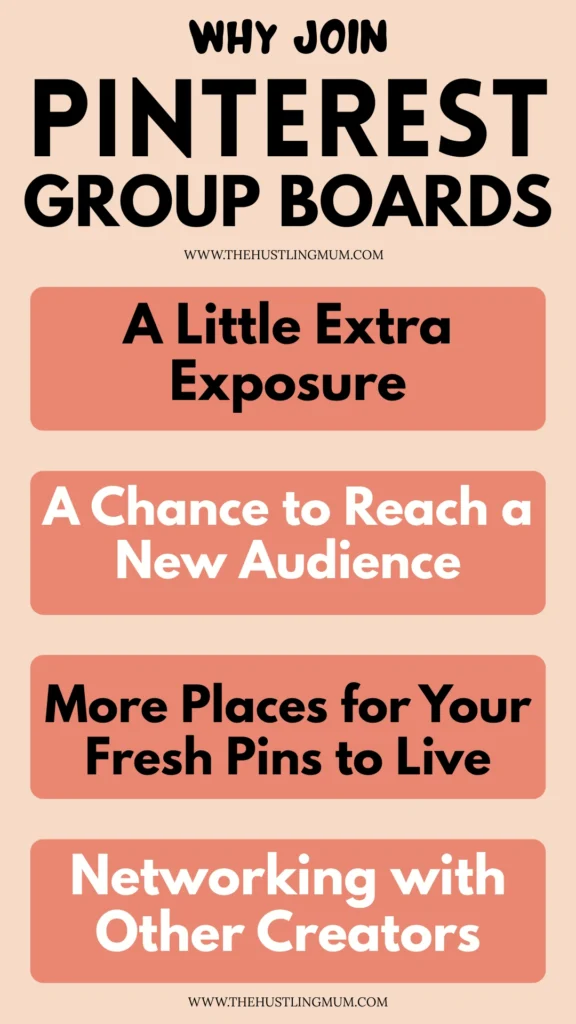
A Little Extra Exposure
When you add a fresh pin to a good, active group board, it may be seen by people who don’t follow you yet.
It’s not a huge traffic boost like in the past, but it can give your content a small visibility push.
Think of it as extra reach — not viral growth.
A Chance to Reach a New Audience
If the board has contributors and followers in your niche, your pins can appear in front of people who are already interested in that topic.
This means your content is being shown to a more relevant audience, which is always a good thing.
More Places for Your Fresh Pins to Live
Adding your pin to a relevant group board gives it another place to exist on Pinterest.
This can slightly increase its chances of being discovered through search or browsing.
Again, it’s supportive — not transformational — but still useful.
Networking with Other Creators
Group boards can sometimes help you connect with bloggers or creators in your niche.
You may discover new accounts, build relationships, or even collaborate in the future.
While Pinterest is more search-focused than social, these small connections can still be valuable.
What Type of Group Boards Are Helpful to Join?
Not every group board will help you grow. In fact, some can slow you down if they are messy or unfocused.
Here’s what you should look for before requesting to join.
Niche-Specific Boards
The board should focus on one clear topic.
If you are a blogging coach, join blogging-related boards. If you write about home decor, look for home decor boards. The closer the board matches your niche, the stronger your content alignment will be.
Pinterest understands topical relevance. When your pins consistently appear in highly focused boards, it strengthens your authority in that topic.
Avoid broad boards that mix too many subjects together. Specific always works better than general.
Well-Managed Boards
Take a few minutes to scroll through recent pins.
Are they organized and relevant to the board title? Or do you see random content being added without any clear direction?
A well-managed board usually has:
Clear topic focus
Consistent pin quality
Relevant content
If the board feels chaotic, that’s a sign the owner is not monitoring it closely. And if it looks messy to you, it likely doesn’t perform well either.
Boards That Are Not Spammy
Spammy boards are easy to spot.
You’ll notice repeated pins, low-quality graphics, off-topic posts, or contributors adding large amounts of content at once.
Pinterest does not favor spam-heavy environments.
Associating your content with cluttered boards can weaken your brand positioning. Choose boards that feel clean, focused, and intentional.
Active But Balanced Boards
Check the activity level.
Are pins being added regularly? That’s good.
But if hundreds of pins are being added every hour, your content may quickly disappear under new uploads.
Look for boards that are active but not overwhelming. A steady flow of content is ideal.
How to Join Group Boards on Pinterest (Updated Step-by-Step Guide)
If you’ve been searching how to join Pinterest group boards, here’s the simple and updated way to approach it.
Take it step by step instead of rushing.
Step 1: Use Pinterest Search the Smart Way
Go to Pinterest search and type very specific keywords related to your niche.
For example, instead of typing “group board,” try:
“Pinterest marketing group board”
“DIY home decor group board”
“Mom blogger group board”
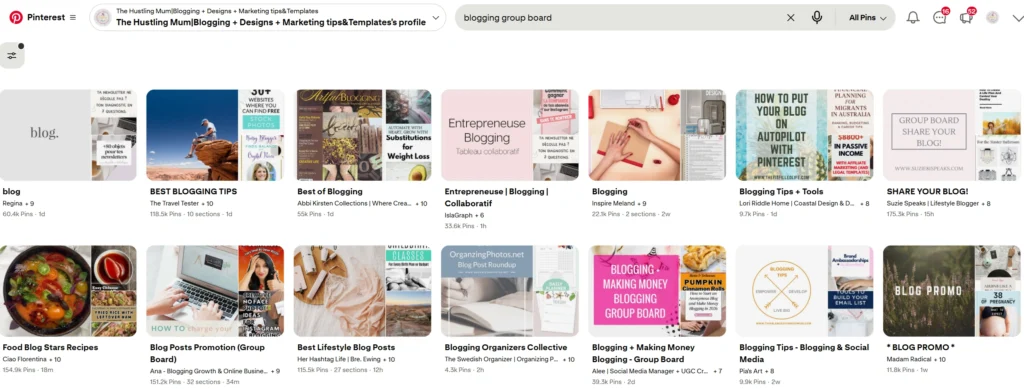
Specific keywords help you find better, more relevant boards.
When you open a board, look at the top. If you see multiple profile icons, that confirms it’s a group board.
Also read:How to find group boards on Pinterest?
Step 2: Look at Other Creators in Your Niche
Sometimes the best group boards aren’t easy to find through search.
Visit profiles of bloggers in your niche. Scroll through their boards and look for ones where they are listed as contributors.
If someone in your niche is contributing to a board, there’s a good chance it’s relevant.
This is one of the easiest ways to discover quality boards.
Step 3: Evaluate the Board Before Requesting Access
Before asking to join, pause and review the board carefully.
Ask yourself:
Is the board focused on one topic?
Are recent pins high quality?
Is the content relevant?
Is it active?
Don’t join just because it has a large number of followers.
Quality and relevance matter much more than size.
Step 4: Read the Board Description Carefully
Most group board owners include instructions in the description.
You might see something like:
“Email me to join”
“Follow this board and send a message”
“DM me on Instagram”
Follow the instructions exactly as written.
If you skip steps or ignore directions, your request may be ignored.
Step 5: Reach Out Politely and Professionally
If there are instructions, follow them.
If not, visit the owner’s profile and check if they have contact details listed.
When you send a message, keep it short and respectful. Introduce your niche and explain why your content would be a good fit for the board.
Professional and clear messages are much more likely to receive a positive response.
What to Do After You Get Accepted to a Group Board
Getting accepted feels exciting, especially if it’s a quality board in your niche. But this is where strategy matters most.
You don’t want to rush in and start pinning everything at once. Instead, take a calm and intentional approach.
Read the Rules Carefully
Before you pin anything, go back and read the board rules again.
Many group boards limit how many pins you can add per day. Some only allow fresh pins. Others don’t allow affiliate links or duplicate content.
Following these rules shows professionalism. It also increases your chances of staying on the board long-term.
Board owners remove contributors who ignore guidelines, so stay mindful.
Pin Only Highly Relevant Content
This is extremely important.
If the board is about Pinterest marketing, only add Pinterest marketing content. Not blogging tips. Not mindset quotes. Not general productivity posts.
Pinterest now prioritizes topic consistency. When your pin perfectly matches the board theme, it strengthens relevance signals.
Relevance is everything on Pinterest.
Focus on Fresh, Optimized Pins
Pinterest favors fresh content.
Instead of re-sharing the same pin design to every group board, create new pin graphics for your blog posts.
Update your titles and descriptions with keywords. Make your pins visually clear and easy to understand.
Then distribute those fresh pins strategically.
This approach works much better than mass pinning old content.
Space Out Your Pins
Avoid adding multiple pins back-to-back.
Spacing out your pins makes your activity look natural and balanced. It also prevents your content from getting buried under rapid uploads from other contributors.
Slow and steady always works better on Pinterest.
Mistakes to Avoid When Using Group Boards
Many bloggers join group boards with high hopes — but end up disappointed.
Usually, it’s because of avoidable mistakes.
Joining Too Many Boards
It’s tempting to join every group board you find.
But too many boards can dilute your niche focus and overwhelm your strategy.
A few high-quality boards are far more effective than twenty random ones.
Choose wisely.
Ignoring Board Activity
If a board hasn’t been updated in months, it won’t help your reach.
Before staying on a board, check if it’s active and consistent.
If it becomes inactive over time, consider leaving it.
Your time and effort matter.
Staying in Spammy Boards
If you notice low-quality pins, unrelated content, or repetitive spam posts, that’s a red flag.
Pinterest does not reward spam-heavy boards.
Associating your content with messy boards can weaken your strategy.
Protect your brand.
Treating Group Boards as Your Main Strategy
This is the biggest mistake.
Group boards are supportive tools. They are not the foundation of growth.
If you rely only on group boards, your traffic will eventually plateau.
Instead, use them as one layer within a broader Pinterest plan.
Do Group Boards Still Work Today?
Yes — but differently.
Years ago, Pinterest heavily distributed content from group boards. Back then, simply being part of large boards could increase visibility quickly.
Today, Pinterest focuses more on:
• Individual pin performance
• Keyword optimization
• Freshness
• User engagement
That means your pin quality matters more than the board size.
However, well-managed, niche-specific boards can still provide:
Additional visibility
Extra distribution
Initial traction for newer accounts
Networking opportunities
Think of them as a bonus boost — not a shortcut.
Should You Create Your Own Group Board?
Instead of constantly searching how to join group boards on Pinterest, consider building your own.
Creating a group board gives you control.
You can:
Choose the niche carefully.
Write an optimized description with keywords.
Set clear rules.
Invite only relevant contributors.
A small, focused group board is often more powerful than a huge, chaotic one.
Quality always wins over size.
Smart Pinterest Growth Strategy Beyond Group Boards
If you truly want consistent Pinterest traffic, focus on the bigger picture.
Create fresh pins regularly.
Design clear and scroll-stopping graphics.
Use keyword-rich titles and descriptions.
Organize your personal boards properly.
Write valuable blog content that solves problems.
When your foundation is strong, group boards simply amplify your efforts.
That’s the balanced approach.
Final Thoughts
If you’ve been wondering how to join Pinterest group boards, I hope this guide gave you more than just steps — I hope it gave you clarity.
Group boards are not the golden shortcut they once were. But they are not useless either.
They work best when they are part of a balanced, intentional Pinterest strategy.
Focus first on strong foundations — fresh pins, clear keywords, optimized boards, and valuable content. Then use group boards as a supportive layer, not the main engine.
Choose niche-specific, well-managed boards. Avoid spammy spaces. Protect your brand and your time.
And if you’ve been asking yourself, “how to join group boards on Pinterest?” — now you know it’s not just about joining.
It’s about joining smartly.
Grow with strategy, not shortcuts. That’s how real Pinterest success happens.
If you found this post helpful, don’t forget to pin it and share it with your friends.
Related posts:
How to find group boards on Pinterest?
What are Pinterest group boards?
How to organize Pinterest boards?
How to delete pins from Pinterest group board?
Pinterest group board list to join.


I am a passionate blogger who loves sharing insights on blogging tips, Pinterest strategies, and making money online. With a knack for simplifying complex concepts, I help readers grow their online presence and achieve their Pinterest marketing goals. Follow along for practical advice and proven tactics to elevate your blog, Pinterest and online business.